 Blog
Blog
Email Campaign Management System
Introduction
For businesses, educational institutions, and organizations, managing communication with a large number of recipients can be challenging. Sending emails, preparing the same message for communication, and tracking communication history can be time-consuming and create unnecessary manual work. An Email Campaign Management System is a centralized platform where project management, recipient datasets, email campaigns, WhatsApp notifications, and communication history can be organized. OpenDevSol’s Email Campaign Management System is built upon this centralized approach by providing features that allow administrators to organize projects and recipient information, manage messages, select communication channels and send to recipients. The system includes email sender management, user management, and campaign history to help administrators track communication activity. Instead of managing each task separately, users can follow a structured process: Organize, Compose, Send, and Track.
What Is an Email Campaign Management System?
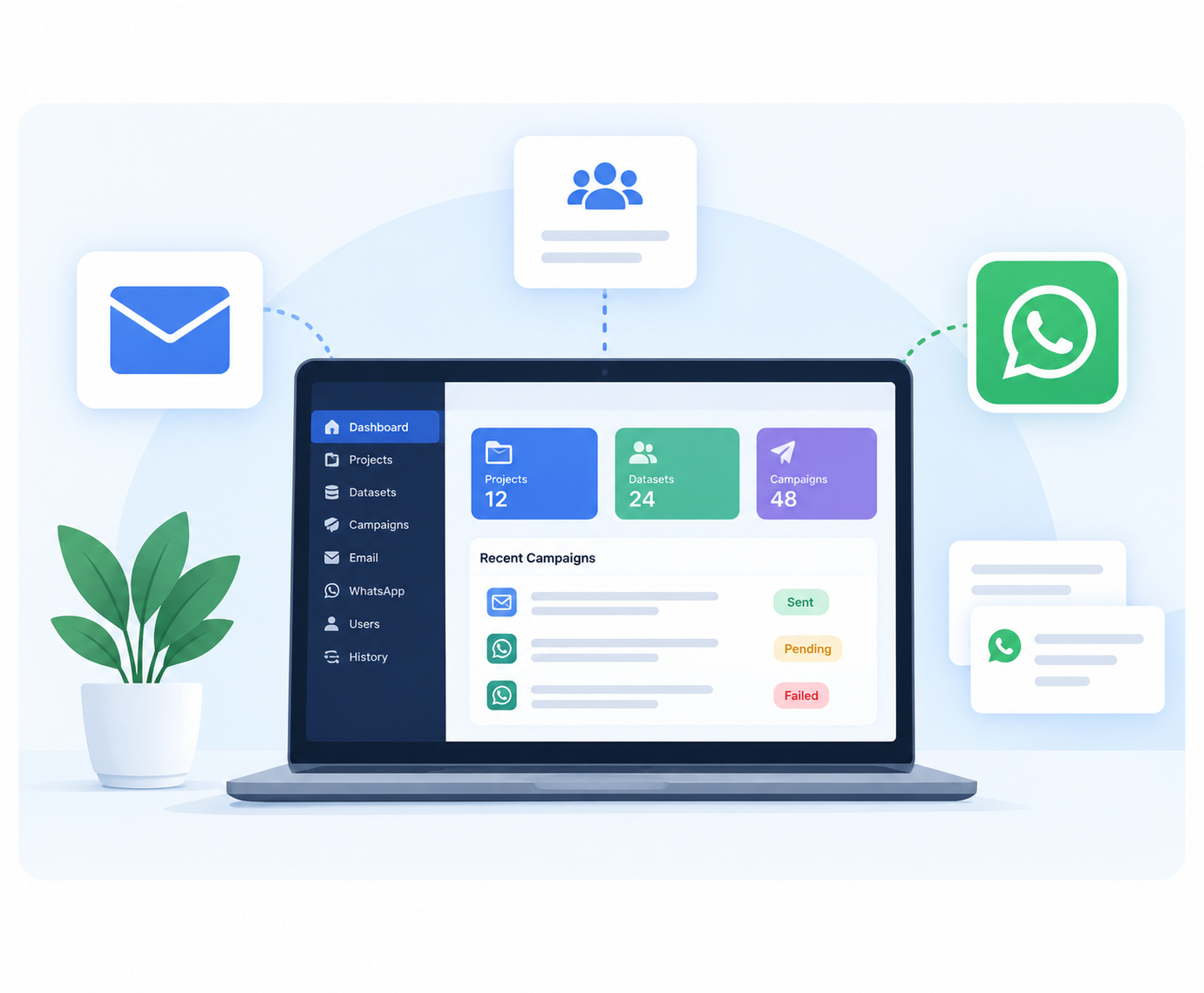
An Email Campaign Management System is a centralized system for organizing projects, datasets, users, and communication activities. It features a dashboard where these activities can be managed. In this project, the Email Campaign Management System allows users to select a dataset, prepare a message, select a communication channel, and send to multiple selected recipients. For example, an educational institution can create an admission campaign, add a student dataset, prepare an admission update message, and send to the selected recipients. Similarly, businesses can use this system to send announcements and important notifications to their organized contact lists to reduce repetitive manual work and make organizing communication easier.
Why Is a Centralized Communication System Needed?
A typical communication process can involve opening contact lists, copy-pasting email addresses, preparing the message, and manually sending emails. As a large number of recipients add to the length of the contact list, this manual process becomes difficult to manage.
This project addresses the following four areas.
-
Sending emails and notifications individually instead of a campaign approach.
-
Manual work involved with large recipient lists.
-
Preparing the same or related message repeatedly for individual recipients.
-
Finding it difficult to scale the contact list while preparing manual communications.
A centralized dashboard helps organize these activities into a consistent workflow and enables users to prepare one message and send it to multiple selected recipients through the selected communication channel.
Key Features of the Email Campaign Management System
1. Centralized Admin Dashboard
The administrator dashboard is the centralized system for managing projects, datasets, campaigns, sender emails, users, and email history. It also provides a campaign overview and actions to create a new project, add a new dataset, or start a campaign. This approach helps users easily access the core features without having to manage multiple activities.
2. Project Management
Project management is the first step, where users can start organizing their communication by adding a new project. The project feature allows adding a project name and purpose, adding the relevant dataset, and saving the project. For example, an institution can add a project named 'Spring Admission Campaign', which defines the purpose of the communication, and use this project to track all communication activities. The project helps users find the relevant dataset containing student emails to prepare the campaign message.
3. Recipient Dataset Management
The dataset stores the recipient information in an organized approach with the relevant columns. The project showcases fields such as ID, Name, Email, WhatsApp Number, and Status. For example, a student dataset can have the names and contact details of students who need to receive an admission update. Keeping recipient details together makes it easier to select the intended recipients when preparing a campaign. Optional fields such as Status and Group can be added, depending on the dataset. The recipient records shown in the project are illustrative examples, not actual customer data.
4. Bulk Email Campaigns
The system supports sending one email campaign with multiple selected recipients.
The project demonstrates the steps for selecting a dataset, preparing the message, selecting the Email communication channel, and sending to the selected dataset. Users can prepare the email subject and message when sending the campaign and select the appropriate sender email address and project dataset. For example, an admission team can prepare an email titled 'Important Admission Update' and send it to the selected student dataset instead of individually preparing and sending each email. This approach helps reduce repetitive manual work and keeps the campaign preparation process organized.
5. WhatsApp Notifications
WhatsApp notifications showcase an additional step with the WhatsApp notification workflow. Users select the appropriate project or dataset, prepare the notification, and send to the selected WhatsApp contacts. For example, a team can prepare a short announcement for letting recipients know that the campaign update is available. Using an organized dataset helps users identify the intended recipients and send notifications in a centralized dashboard.
Important: WhatsApp messaging should follow the relevant WhatsApp Business policies in terms of recipient permission and associated requirements. The method and capabilities of WhatsApp messaging depend on the implementation used.
6. Multiple Sender Email Management
The system supports managing multiple sender email addresses from one place. The project showcases sender addresses for Marketing, Admissions, and Support. When sending a campaign, users can select the appropriate sender address for the communication.
For example, an admission announcement can be sent with the admission email address, whereas a customer support notification can use the support email address.
7. Email and Notification History
Keeping a history of campaigns and notifications is important when managing multiple campaigns. The system allows reviewing campaign activity and the displayed delivery status with the email and notification history. The project showcases categories such as successful, pending, and failed/incomplete. A history record can show the campaign name, communication channel, date, number of recipients, and overall status. These records help administrators review campaign activity and identify any records that may need attention. The percentages and number of recipients shown in the campaign project are illustrative examples and not verified results.
8. User Management
The system features a centralized user management, allowing administrators to add and manage system users. The project showcases different user roles, including Campaign Manager, Content Manager, and Operator. This approach provides an organized approach for managing users involved in campaign preparation and communication activities. The actual permissions depend on the roles and implementation used in the system.
How Does the System Work?
The project follows a simple seven-step process:
Step 1. Create a Project. Add the project name and purpose to organize the communication activity.
Step 2. Add a Dataset. Store the recipient information for the campaign.
Step 3. Compose the Message. Prepare the email or WhatsApp notification.
Step 4. Select the Sender Email. Choose the appropriate email address for an email campaign.
Step 5. Select the Channel. Choose between Email and WhatsApp.
Step 6. Send in Bulk. Send the campaign to the selected recipients.
Step 7. Check History. View the campaign record and status.
This approach brings the main communication activities into one organized process, making them easier to manage and review.
Benefits of the Email Campaign Management System
The Email Campaign Management System offers a number of benefits for organizations that manage communication with multiple recipients.
- Time saving:
Reduces repetitive manual sending activities.
- Bulk communication:
Enables sending of campaign messages to multiple selected recipients.
- Centralized management:
Keeps projects, datasets, campaigns, and users in one dashboard.
- Multiple communication channels:
Supports email campaigns and WhatsApp notifications.
- Sender organization:
Enables management of multiple sender email addresses.
- Campaign history:
Allows records and status for reviewing communication activity.
- User organization:
Supports centralized management of system users.
- Structured workflow:
Connects project creation, recipient selection, message composition, sending, and tracking.
These benefits focus on the functions demonstrated in the project, not unverified claims about guaranteed delivery, increased conversions, or measured time savings.
Who Can Use This System?
The centralized communication process can be beneficial for many organizations that need to communicate with many recipients.
Educational Institutions:
Organize student datasets and provide admission updates or announcements.
Businesses:
Send relevant announcements and notifications to their organization's contact list.
Marketing Teams:
Manage campaign projects, prepare messages, and review campaign history.
Customer Support Departments:
Use appropriate sender addresses and organize communication for relevant notifications.
Organizations with Multiple Departments:
Manage campaign activities and users within a shared dashboard.
The most suitable implementation depends on each organization's recipient data, communication requirements, email infrastructure, and WhatsApp integration.
Why Choose OpenDevSol?
OpenDevSol offers digital services including web development and design, custom web applications, UI/UX design, CRM, ERP solutions, branding, and digital marketing. OpenDevSol’s Email Campaign Management System project demonstrates how a centralized application can bring important communication activities into one structured interface. If your organization needs to organize projects, maintain recipient datasets, send bulk emails, manage WhatsApp notifications, or review campaign history, OpenDevSol can discuss your requirements and help you explore an appropriate digital solution. Ready to organize your communication workflow? Contact OpenDevSol to discuss your project requirements, and take the next step toward centralized communication management.
Frequently Asked Questions (FAQs)
1. What is an Email Campaign Management System?
It is a platform for organizing projects, recipient datasets, email campaigns, users, and communication history in one centralized dashboard.
2. Can this system send bulk emails?
Yes. The project allows selecting a dataset, preparing an email, and sending the campaign to multiple selected recipients.
3. Does the system support WhatsApp notifications?
Yes. The project includes a process for selecting a dataset, preparing a WhatsApp notification, and sending to the selected recipients.
4. What is a dataset in an email campaign system?
A dataset is an organized list of recipients. In this project, it can include IDs, names, email addresses, WhatsApp numbers, and optional status or group fields.
5. Can I manage multiple sender email addresses?
Yes. The project includes a feature for managing multiple sender email addresses and selecting the appropriate sender when preparing an email campaign.
Conclusion
An Email Campaign Management System will unify your project, dataset, bulk mail, WhatsApp, sender emails, users, and history in one place. Our project uses a specific approach, which comprises such steps as Create a Project, Add Dataset, Compose a Message, Pick a Channel, Send in Bulk, and History. It will help you eliminate several communication-related tasks, organize them in a unique interface, and eliminate any unnecessary repetition.
Contact OpenDevSol now to discuss your Email Campaign Management System requirements and visualize a central communication platform for your business!